
Table of Contents
- Why Screen Prints Need Dryer Protection
- How to Wash Screen Printed Shirts Before Drying
- Turn Garments Inside Out Before the Dryer
- Select the Correct Dryer Heat Setting
- Best Way to Dry Graphic T-Shirts: Air Dry vs. Tumble Dry
- Prevent Screen Print Peeling and Cracking
- Remove Garments Promptly and Store Correctly
- Conclusion
- Frequently Asked Questions
Last Updated: September 20, 2026
Why Screen Prints Need Dryer Protection
Screen printed apparel is an investment. The graphics you choose tell your story, whether that's your service, your values, or your identity. But to protect screen prints dryer damage, you need to understand how heat and friction can harm those prints faster than you'd expect.
The problem is simple: screen prints need dryer protection because high temperatures and tumbling motion break down the ink bond to fabric. Plastisol inks (the most common type) soften under heat. Waterbased inks crack when exposed to excessive thermal stress. Either way, your graphic fades, peels, or cracks.
Most people don't realize this until it's too late. You pull a favorite shirt from the dryer and notice the print is already lifting at the edges. Once that damage starts, it accelerates. The next wash makes it worse.
The good news: protecting your screen prints is straightforward. A few simple steps prevent most damage and extend the life of your apparel dramatically. Protecting your screen prints is straightforward. A few simple steps prevent most damage and extend the life of your apparel dramatically.
How to Wash Screen Printed Shirts Before Drying
Washing is the first line of defense. The way you wash determines how much stress the print endures before it even reaches the dryer.
Start with cool water. Hot water accelerates ink breakdown and can set stains into the fabric. Cool water cleans effectively without thermal stress.
Use mild detergent. Heavy-duty or enzyme-based detergents are too aggressive for screen printed apparel. They break down the ink's adhesive bond. A standard, gentle detergent works just as well and protects your graphic.
Turn the shirt inside out before washing. This reduces direct mechanical agitation on the print surface. The fabric interior absorbs most of the friction from the wash cycle.
Avoid the heavy-duty or normal wash cycle. Select the delicate cycle instead. This reduces the spin speed and mechanical agitation that can weaken the print's bond to the fiber.
Turn Garments Inside Out Before the Dryer
This is the single most effective step you can take. Turning your shirt inside out before drying protects the print from direct heat and friction.
When the print faces inward, the blank fabric side absorbs most of the dryer's heat and tumbling action. The graphic itself stays shielded. This one step reduces heat damage by a significant margin.
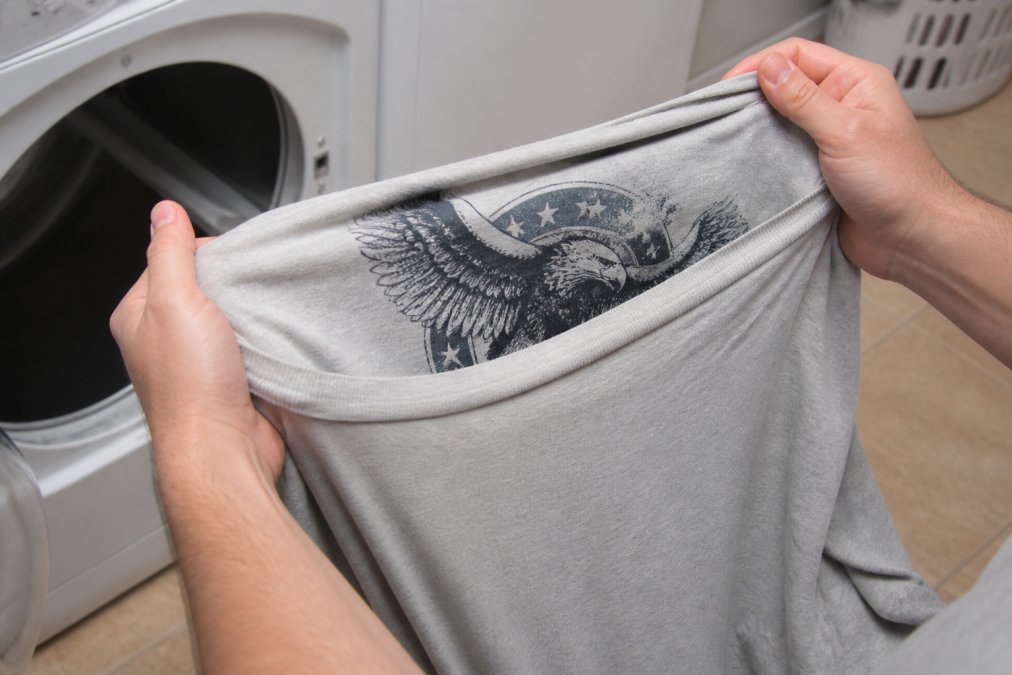
The mechanics are straightforward. Dryer tumbling creates friction between garments. When your print faces outward, it experiences direct contact with other fabrics and the drum. When it faces inward, the softer interior fabric takes that friction instead.
This works for all print types. Whether your graphic is plastisol or waterbased ink, the protective effect is the same. The print stays cooler and experiences less mechanical stress.
Make this a habit. It takes five seconds and costs nothing. Every shirt that leaves your washer should be turned inside out before it goes into the dryer.
Select the Correct Dryer Heat Setting
Heat is the enemy of screen prints. The hotter your dryer runs, the faster your ink breaks down. But "low heat" alone isn't the complete picture, cycle duration and fabric type matter just as much.
Understanding dryer temperature ranges:
Most dryers have three settings: high, medium, and low. Use low every time for screen printed apparel.
-
High heat: Reaches 150°F or higher. At this temperature, plastisol inks soften and lose their grip on the fabric within 20-30 minutes. Waterbased inks become brittle and crack. Even medium heat accelerates fading and peeling.
-
Low heat: Typically runs between 120°F and 140°F. This temperature range dries your clothes effectively while keeping thermal stress minimal. Your prints stay intact. The fabric doesn't shrink or stiffen.
If your dryer doesn't have a low setting, check the manual. Some newer dryers use different terminology. Look for "delicate," "air dry," "sensor dry," or "low temperature" options. Any setting below 130°F works.
Cycle duration is critical:
Heat damage isn't just about temperature, it's about time at temperature. A 60-minute low-heat cycle causes more damage than a 30-minute cycle at the same temperature.
THE EYE STINGER Unisex Cotton Crew Tee →
For screen printed apparel, aim for 30-40 minutes on low heat maximum.
Fabric composition changes the equation:
-
100% cotton prints: Cotton is stable under low heat. A 100% cotton screen printed shirt can tolerate 35-40 minutes on low heat without significant damage. Air drying is still preferred, but low-heat tumble drying is acceptable if you're in a time crunch.
-
Cotton-polyester blends (50/50 or 60/40): Polyester has a lower melting point than cotton (around 260°F for the fiber itself, but ink adhesion fails well below that). Blended fabrics shrink unevenly under sustained heat, creating tension that cracks the ink layer. Limit low-heat cycles to 25-30 minutes maximum. Air drying is strongly recommended.
-
High-polyester or performance fabrics (moisture-wicking): These are the most heat-sensitive. The synthetic fibers can warp, and the ink bond is often weaker on slick surfaces. Use low heat for no more than 20-25 minutes, or air dry exclusively.
Practical steps:
- Turn the shirt inside out before loading.
- Select low heat.
- Set a timer for 30 minutes (or use sensor dry if available).
- Remove the garment as soon as the cycle ends, don't let it sit in residual heat.
Best Way to Dry Graphic T-Shirts: Air Dry vs. Tumble Dry
The dryer isn't your only option. Air drying eliminates heat and mechanical stress entirely.
Prevent Screen Print Peeling and Cracking
Peeling and cracking are the most visible signs of print failure. Both are preventable with the right approach, and both can be slowed or halted if caught early.
Understanding the root causes:
Fabric composition matters:
Prevention strategy:
Troubleshooting prints that are already damaged:
-
For peeling edges: Stop using heat immediately. Switch to air drying exclusively. Wash less frequently (every 3-4 wears instead of after each wear). When you do wash, use cool water and the delicate cycle. The peeling will likely continue slowly, but you'll buy months or years of additional wear before the graphic fails completely.
-
For fine cracks: These indicate the ink is becoming brittle. Again, eliminate heat. Air dry only. Consider hand-washing instead of machine washing to reduce mechanical stress. Some users report that applying a thin layer of fabric-safe clear sealant (like Mod Podge fabric or a textile topcoat) can seal small cracks and prevent them from spreading, though this changes the hand-feel of the print.
-
For widespread damage: If more than 30% of the graphic is peeling or cracked, the shirt is nearing end-of-life. At this point, focus on preventing total failure rather than restoration. Wash by hand in cool water, air dry, and wear it for lower-stakes activities (sleeping, yard work, exercise) where print quality matters less.
| Problem | Cause | Prevention | If Already Damaged |
|---|---|---|---|
| Peeling | Heat + friction | Air dry or low heat, inside out | Air dry only, wash less often |
| Cracking | High heat + ink brittleness | Low heat only, air dry preferred | Air dry only, reduce wash frequency |
| Fading | Repeated heat cycles | Cool water wash, low heat dry | Avoid heat, limit sun exposure |
| Shrinkage | High heat + agitation | Delicate wash, low heat dry | Already permanent; prevent on other items |
| Abrasion damage | Dryer balls, zippers, friction | Remove dryer balls, wash similar items | Air dry, hand wash if possible |
Remove Garments Promptly and Store Correctly
The moment your dryer cycle ends, heat damage continues if clothes stay inside, which is why you need to protect screen prints dryer heat by removing garments promptly.
Conclusion
Protecting screen prints in the dryer comes down to three core actions: wash cool, dry on low heat or air dry, and turn everything inside out. These steps work together to minimize thermal stress and mechanical friction, the two factors that destroy graphics fastest.
Frequently Asked Questions
Can I put screen printed shirts in the dryer?
Yes, you can dry screen printed shirts in the dryer, but with precautions. Use low heat settings (below 130°F) to prevent ink cracking and fading. Turn the shirt inside out to minimize direct contact between the print and tumble friction. Remove garments promptly once the cycle ends to avoid heat damage and wrinkles. High heat exposure causes thermal stress on plastisol and water-based inks, leading to peeling and color loss.
What is the best heat setting for drying graphic tees?
Low heat is best for screen printed apparel. Set your dryer to the lowest heat option, typically 130°F or less. Some dryers have a delicate cycle or air-dry setting that works even better for print longevity. Avoid high heat entirely, it accelerates ink cracking and shrinkage. If your dryer has a timed cycle, use 30-45 minutes on low rather than auto-sense, which may extend heat exposure unnecessarily.
How do I prevent screen print designs from cracking in the dryer?
Prevent cracking by combining several strategies: wash in cool water with mild detergent, turn shirts inside out before drying, use low heat settings, and remove garments immediately after the cycle. Mechanical agitation from tumbling combined with high heat causes thermal stress on ink. Dryer balls can increase friction and worsen damage, so skip them for screen printed items. Air drying eliminates heat damage entirely and extends print longevity significantly.
Should I turn my shirts inside out before drying?
Absolutely. Turning screen printed shirts inside out protects the graphic from direct tumble friction and reduces heat exposure to the printed surface. The inside of the garment experiences less mechanical agitation than the outside. This simple step dramatically reduces ink peeling, cracking, and color fading. Make it a habit for every wash and dry cycle to maintain garment integrity and print durability.